FREE EXCEL DOWNLOAD
Rental property comparison spreadsheet
Compare four properties, offers or financing choices side by side. See what each needs upfront and what it could earn.
Download Excel (.xlsx)Free. No account needed.
Already filled it in? Open a column in the analyzer →
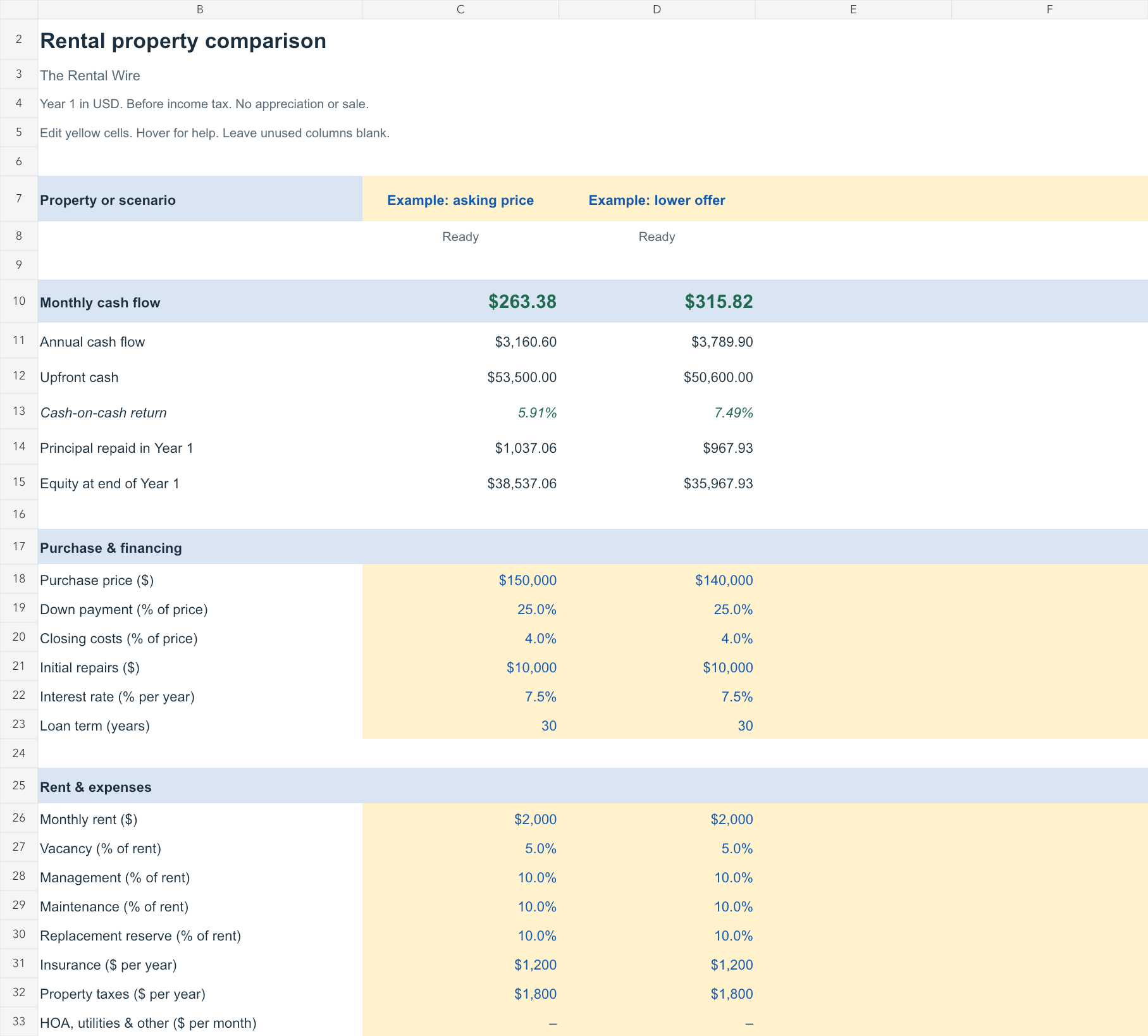
One column per choice.
- Change the inputs
- Price, financing, rent and costs. Two examples are filled in; two columns are yours.
- Compare the results
- Monthly cash flow, upfront cash and cash-on-cash return. Loan paydown stays separate.
- Check the details
- Working formulas, monthly loan balances and hover notes explaining the assumptions.
THE INCLUDED EXAMPLE
What does a lower offer change?
USD · Year 1 · Before income tax
| Same rental, two offers | Asking price | Lower offer |
|---|---|---|
| Purchase price | $150,000 | $140,000 |
| Upfront cash | $53,500 | $50,600 |
| Monthly cash flow | $263.38 | $315.82 |
| Cash-on-cash return | 5.91% | 7.49% |
| Loan principal repaid | $1,037.06 | $967.93 |
Example assumptions & what’s excluded
Both use $2,000 monthly rent, 25% down, a 7.5% fixed-rate loan over 30 years, 4% closing costs and $10,000 in initial repairs. Vacancy is 5% of rent. Management, maintenance and replacement reserves each use 10%. Insurance is $1,200/year and property taxes are $1,800/year.
The workbook compares the first year before income tax. It excludes appreciation, sale proceeds and any extra cash cushion. Management and reserves use scheduled rent, before vacancy.
Take a closer look online.
Save your workbook, choose a property column and carry its inputs into the free analyzer.
For longer-range projections inside Excel, use the 30-year rental analysis workbook.
The comparison covers Year 1. Rent and expense growth start at 0% in the analyzer; adjust them there.